
Casino Lux Registration: Sign Up by Phone or Email
You can open a Casino Lux account in two ways: registering with a phone number or registering with an email address. The form has a handful of required fields, and you need to tick a box confirming you are 18 or older. Once the account is open, identity verification steps get your account ready for withdrawals.
How Does the Registration Process Work?
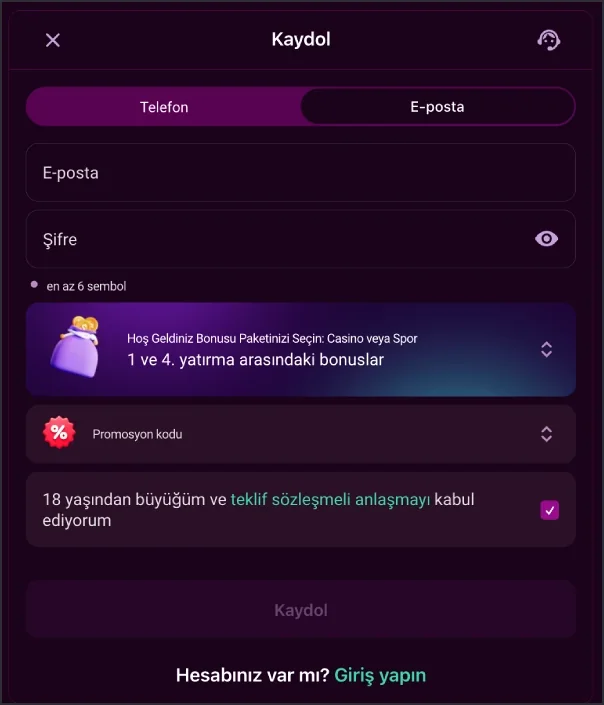
So how does registration actually work? — The form is split into two tabs: Phone and Email. On the Phone tab you first pick a country code; +90 comes up by default for Turkey. You enter the number in the +90(XXX) XXX - XXXX format, then set a password of at least 6 characters. A small icon next to the password field lets you toggle the characters visible.
Does the Email tab work differently? — The field structure is similar. You enter your email address and set a password. Both tabs also include a welcome package choice (Casino, Sport or no bonus) and an optional promo code field.
Can I submit the form before it's fully filled in? — No. The Sign Up button stays inactive until the required fields are complete and the 18+ and agreement checkbox is ticked. That checkbox confirms you accept the Offer Agreement.
Required Fields on the Registration Form
On the Phone tab, the fields you need to fill in are listed below; each one serves a different purpose in the form:
| Field | Description |
|---|---|
| Country code | Defaults to +90 (Turkey); can be changed if needed. |
| Phone number | Entered in the +90(XXX) XXX - XXXX format. |
| Password | At least 6 characters; visibility can be toggled. |
| Welcome package | Casino, Sport, or registration without a bonus. |
| Promo code | Optional field. |
| Consent checkbox | 18+ confirmation and Offer Agreement acceptance; required. |
On the Email tab, the phone number and country code fields are replaced by a single email address field; the password, welcome package, promo code and consent checkbox work the same way.
What Does the One-Account Rule Mean?
Can a user open more than one account? — No. Platform rules allow each user to register only a single account. A second account belonging to the same person goes against the account rules.
Can funds be transferred between accounts? — No. Transfers between different user accounts, and accepting transfers from third parties, are both prohibited under the rules. This restriction works alongside the one-account rule as an account security measure.
What data does the system log automatically? — Your IP address and browser information are logged automatically by the system during registration and while you're signed in. This is part of the registration process from a data protection and account security standpoint. Information you enter on the registration form is protected with 256-bit SSL encryption, which underpins the platform's data security.
How Is Identity Verification (KYC) Completed?
Which provider handles document verification? — Document verification runs through KYCAID, an independent verification service. On the "Submit your documents" form, you choose one of three document types: ID card, Passport, or Drivers license.
Do I need to upload the document from a computer? — No, that's not required. The form also offers an "or continue on your phone" option, letting you photograph the document directly with your phone's camera and upload it that way. Once you select the document type, the Submit button takes you to the file upload step.
How should I enter my name? — During registration and verification, your name is expected to be entered in Latin characters where possible, matching your document. The platform also reserves the right to verify your age, country of residence and current location.
Steps to Complete Before Withdrawing Funds
Before you can submit a withdrawal request, three steps need to be completed on your account:
- Confirm your phone number.
- Confirm your email address.
- Make your first deposit with real money.
A withdrawal cannot be started until all three steps are done. The information on the registration form and the KYCAID document check are separate processes; together they get your account ready for withdrawals. Once a withdrawal request is approved, the payout goes through the same method you used for your deposit.
Choosing a Bonus During Registration
After selecting your welcome package on the registration form, you still need to complete a separate activation step from the bonus hub to receive it. If you'd rather not deposit right away, a separate option exists: the No-Deposit Bonus is worth 500 TRY and carries no deposit requirement; crediting it to your account depends on completing phone and email verification.
Once registration is complete, you can sign in from the login page with your phone number, email or account ID. Registration only happens once; on later visits, your login details are all you need. You can browse the platform's other categories from the homepage.
Frequently Asked Questions
Is there a difference between phone and email registration?
The field structure is largely the same. The phone tab asks for a country code and number, the email tab asks for an email address; both tabs share a password field, welcome package choice and the consent checkbox.
Can the same person open a second account?
No. Platform rules allow each user to open only one account, and transfers between accounts or from third parties are not permitted.
Which documents are accepted for KYC verification?
The KYCAID form accepts an ID card, a passport or a driver's licence. The document photo can also be uploaded directly from your phone.
Is choosing a bonus mandatory during registration?
No. The registration form lets you select Casino, Sport or no bonus at all; registering without a bonus is possible.
What do I need to do before withdrawing funds?
You need to confirm your phone number and email address, then make your first deposit with real money. A withdrawal request is not processed until all three steps are complete.